




Building an e-commerce store that grows with your business is essential for long-term success. But what does it mean to build a scalable e-commerce store?
In simple terms, it’s creating an online store that can handle increasing traffic, product listings, and orders as your business expands. So, whether you’re just starting or you’re ready to grow, it’s crucial to make sure your store can scale with you.
Let’s dive into how to build a scalable e-commerce store for growth. I’ll walk you through some practical steps that can help you prepare your business for success.
What Is Scalable E-Commerce?
Before we dive into the steps to build a scalable e-commerce store, it’s important to understand what “scalable” means in the context of e-commerce. A scalable e-commerce solution refers to a system that can handle increasing traffic, orders, and product listings without compromising performance or user experience. This is where professional ecommerce development services play a critical role. As your business grows, you’ll want to ensure your platform can handle:
- Increased traffic and website visitors
- A growing product catalog
- More customer orders and payments
- Enhanced customer support and communication
A scalable e-commerce solution adapts to these needs, ensuring that you don’t face bottlenecks that could lead to lost sales or poor customer experience.
Why Is It Important to Build a Scalable E-Commerce Store?
Building a scalable e-commerce store is crucial for several reasons. Without scalability, your website might experience slowdowns during peak traffic, especially during sales events or promotional periods. As your business grows, so does the volume of transactions, and a system that isn’t scalable could lead to a poor user experience, lost revenue, and customer dissatisfaction.
1. Ensures Continuous Growth

When you build a scalable e-commerce store, you ensure that your platform grows with your business. As your customer base expands, your website needs to perform seamlessly to maintain sales and customer retention. A well-architected system ensures that your e-commerce store grows without interruptions or technical setbacks.
2. Improves Customer Experience
Customer satisfaction is critical to success in e-commerce. A scalable platform helps maintain a smooth browsing and purchasing experience, even during high traffic periods. When your e-commerce store is scalable, your customers are less likely to experience downtime or slow loading times, resulting in higher conversion rates and customer loyalty.
3. Reduces Operational Costs
While it may seem counterintuitive, building a scalable e-commerce store can help reduce long-term operational costs. With scalability built into your system, you can handle growing business demands without constantly needing to overhaul your platform. This saves you money on future upgrades and IT management.
Steps to Build a Scalable E-Commerce Store for Growth
Here are the practical steps to help you build a scalable e-commerce store for growth:
1. Choose the Right E-Commerce Platform
Your platform is the backbone of your store. Choosing the right one is crucial. You need a system that allows for flexibility and scalability. Here are a few great options:
- Shopify: Easy to use and perfect for businesses looking to scale. It’s reliable and can grow with you.
- Magento: Offers more customization if you’re building a large-scale business.
- WooCommerce: If you’re already on WordPress, WooCommerce is a great choice. You can scale with the right hosting and plugins.
The platform you choose should be able to handle an increase in visitors, products, and transactions without crashing. It should also integrate with tools for marketing, inventory, and payments.
2. Invest in Responsive Web Design

In today’s world, your e-commerce store needs to look great and function well on any device. Whether it’s a phone, tablet, or desktop, the experience should be seamless. With more and more shoppers browsing on mobile devices, a responsive design is non-negotiable.
A responsive design ensures your customers can shop from anywhere, and that’s key for attracting more visitors and increasing sales.
3. Use Scalable Hosting
When your store starts growing, your hosting needs to grow with it. Regular hosting might not cut it as you start getting more traffic. That’s why it’s important to opt for cloud hosting or other scalable options.
Services like Amazon Web Services (AWS) or Google Cloud let you adjust your hosting resources as needed. When your website gets more visitors, you can simply scale up your hosting to accommodate the increase in traffic.
4. Speed Up Your Site
Speed is everything. If your site takes too long to load, visitors will leave, and you’ll lose sales. A scalable e-commerce store needs to load fast no matter how many people are visiting. Here are a few things to keep in mind:
- Compress images to make them load faster.
- Enable caching, so visitors don’t have to load the same information repeatedly.
- Use a Content Delivery Network (CDN) to serve your site faster worldwide.
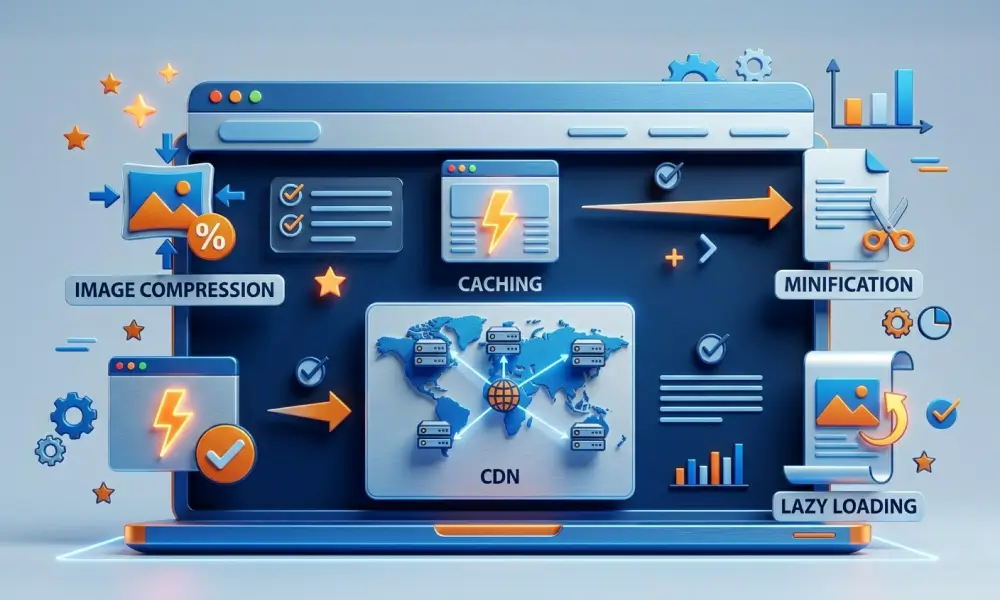
By investing in site speed, you’re improving both the customer experience and your SEO, helping you attract more organic traffic.
5. Set Up an Efficient Payment Gateway
As you grow, you need a payment gateway that can handle increasing orders without failing. Make sure to integrate a payment system that’s secure, reliable, and easy for your customers to use. Stripe, PayPal, and Square are all popular options that scale with your business.
Make sure your checkout process is smooth and simple, so customers aren’t dropping off before completing their orders.
6. Automate Your Inventory Management
A growing product catalog means more work. Keeping track of all your stock manually will eventually become a nightmare. Instead, invest in inventory management systems that can automatically update your stock levels, manage reorders, and prevent stockouts.
There are various tools and plugins for automating this process, and doing so will save you time and prevent mistakes. It’ll also keep your store running smoothly as it scales.
7. Use Scalable Marketing Strategies
As your e-commerce business grows, so should your marketing. It’s important to implement marketing strategies that scale with your store. Whether it’s through email campaigns, social media ads, or SEO, you need to ensure that your marketing can keep up with your growth.
Automate processes like email marketing with tools like Mailchimp or Klaviyo to reach customers at different stages of their buying journey.
Best Practices for E-Commerce Growth
Building a scalable store is just part of the equation. Here are some best practices to help your e-commerce business grow:
- A/B Test Everything: Constantly test different elements on your site, from product pages to calls to action, to see what works best.
- Focus on Customer Service: Happy customers become repeat customers. Provide easy ways to contact support, offer fast shipping, and have a clear return policy.
- Monitor Your Metrics: Use tools like Google Analytics to track customer behavior, sales data, and other key performance indicators (KPIs).
Build Your Scalable E-Commerce Store for the Future
Building a scalable e-commerce store for growth is essential if you want your business to succeed long-term. By choosing the right platform, optimizing your site for speed, and implementing scalable payment and inventory systems, you’re setting yourself up for growth and success.
Are you ready to build a scalable e-commerce store that grows with your business? Contact us today at Compilex Technologies to get started on your journey to e-commerce success!